
Homily Chart HD1.1 - Get APK
You'll be able to download in few seconds.
Publisher Description
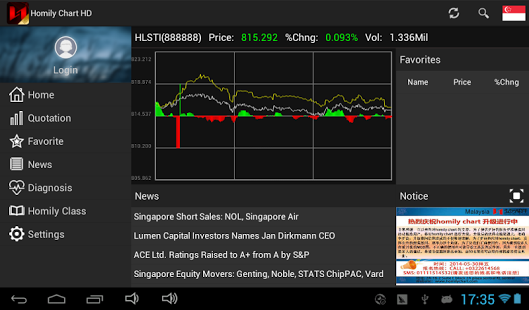
HomilyChart Description:
Homily software came into the world in August 8, 1998 when China stock market and information technology were in the ascendant. Its investment philosophy — Index, first; stock, next. Long-term, first; short-term, next. Operate the Familiar. — is derived from America capital market, and has been proved correct and valuable in the capital market of China, Singapore , Malaysia, etc. It takes technical analysis and trend theory as product core, and provides analytical softwares, training courses, etc. We believe that a winner in the stock market should be equipped with right method, professional tool and nice mindset.
Handheld Homily Software is:
A concentrated version which has 14 years experience and intelligence;
An updated version based on Homily analysis and dynamic quotation data;
A simplified version which combines classical technical analysis, decision making system and portfolio management.
Its main functions are:
Stock market data view;
Index and sector analysis;
Intraday chart of Index and individual stocks;
Candlestick chart of general periods;
Technical analysis indicators (including general indicators: KDJ, MACD, etc; as well as Homily proprietary functions: Homily Rainbow, Multicolor Dragon, Red & White Circle, etc.
Handheld Homily Software aims to meet Singaporean investors’ demands by improving R&D and updating level. If you have new ideas and demands, please let us know through Review in App Store; we will customize more excellent investment tools for you.
About Homily Chart HD
The company that develops Homily Chart HD is Capitalmaster Pte Ltd. The latest version released by its developer is 1.1.
To install Homily Chart HD on your Android device, just click the green Continue To App button above to start the installation process. The app is listed on our website since 2014-05-31 and was downloaded 0 times. We have already checked if the download link is safe, however for your own protection we recommend that you scan the downloaded app with your antivirus. Your antivirus may detect the Homily Chart HD as malware as malware if the download link to com.homilychart.hd is broken.
How to install Homily Chart HD on your Android device:
- Click on the Continue To App button on our website. This will redirect you to Google Play.
- Once the Homily Chart HD is shown in the Google Play listing of your Android device, you can start its download and installation. Tap on the Install button located below the search bar and to the right of the app icon.
- A pop-up window with the permissions required by Homily Chart HD will be shown. Click on Accept to continue the process.
- Homily Chart HD will be downloaded onto your device, displaying a progress. Once the download completes, the installation will start and you'll get a notification after the installation is finished.
Program Details
System requirements
Download information
Pricing
Version History
version 1.1
posted on 2014-05-31
2014-05-31:,1. change app Action Bar Style on android 3.0 system.
Disclaimer
External Download
We do not host Homily Chart HD on our servers. We did not scan it for viruses, adware, spyware or other type of malware. This app is hosted by Galad and passed their terms and conditions to be listed there. We recommend caution when installing it.
The APK Download link for Homily Chart HD is provided to you by apps112.com without any warranties, representations or guarantees of any kind, so access it at your own risk.
If you have questions regarding this particular app contact the publisher directly. For questions about the functionalities of apps112.com contact us.
